Last updated 2026-04-09 by Oskar
If you want to dive deeper, we have these guides as well
So you have decided to take part in Risk tournaments? Awesome! We hope you will enjoy your stay and have loads of fun!
This guide will hopefully provide a basic understanding of how Risk tournaments work and give all necessary information for your first week. You will primarily be able to read about how to find tournaments, the signup process, availability, Friends of Risk, new rounds, swaps, and how the games are set up. A dictionary of common terms can also be found at the end.
If you believe something important is missing or you have any further questions, feel free to contact Oskar (@ob_valo) on Discord.
There are currently a bunch of different Discord servers that host Risk tournaments. Below you will find how to navigate the RISK: Global Domination server, as well as how to find tournaments on other smaller servers.
If you are in the server and want to receive pings for announcements containing new tournaments, head over to `Channels and roles` (found at the top of your channel list) and select the options shown in the picture below.
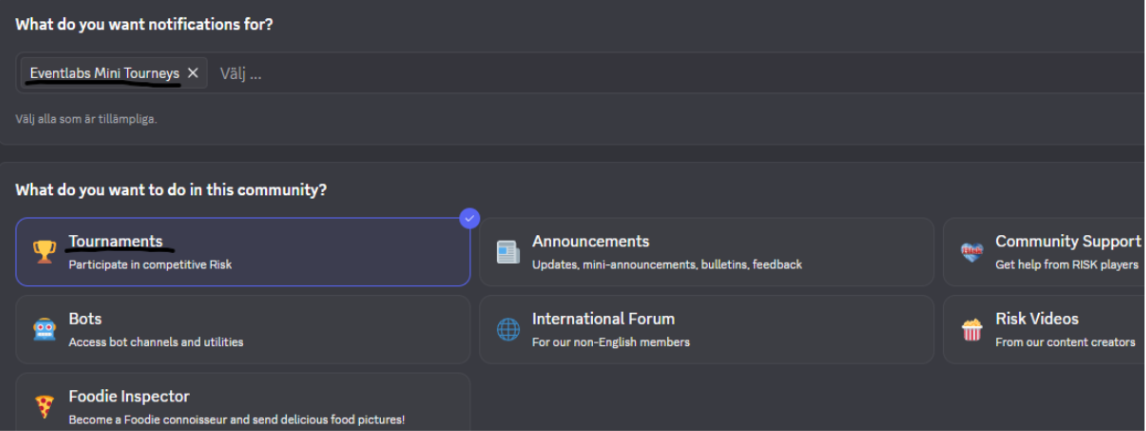
Tournaments here are announced in either #event-announcements or #eventlabs-announcements, and the appropriate roles are pinged. The announcements include instructions on how to sign up.
The full calendar showcasing all upcoming events on the main server can be found here.
Most other tournaments and the servers on which they are held can be found here. I suggest reaching out in the server’s general chat if you are having trouble signing up.
The signup thread will be linked in all announcements advertising a tournament. Simply click the provided link to be taken to the signup thread.
Type the words “Sign up” in the signup thread to join the tournament.
If it is your first tournament, riskbot will mention you in a response to your original message and ask you to set up your availability. To do this, click the button labeled “Set up availability” in riskbot’s response. This will redirect you to the availability page on Friends of Risk. Fill in the times when you are able to play and save it.
Once this is done, riskbot will mention you again in the signup thread, this time confirming that you are now signed up.
When signing up for the first time, you are asked to fill in your availability. The time slots you select are in UTC unless you choose to use your local timezone by clicking the corresponding button. Make sure to convert your time correctly, or you may end up scheduled at suboptimal times.
It is recommended that you pick all the times you can comfortably play at, as this reduces the chances of being scheduled outside your availability.
You can update your availability at any time by using the /availability command in the tournament`s help thread or logging in to friendsofrisk.com.
Nearly all tournaments nowadays are run through Friends of Risk.
You can find everything concerning the tournament you are playing there: the standings, the groups, the settings, and the rules.
If you type “!staff” in any thread related to the tournament, you will ping Event Staff, who will assist you when they are available.
All ongoing tournaments are visible here.
Start off by reading the rules and information document for the tournament you are playing. This is crucial to obtain all the necessary information you need to compete. It will for example tell you when the tournament starts.
New rounds begin on Mondays. Groups are usually made between 20:00 UTC on Sundays and 10:00 UTC on Mondays. Games generally start at 00:00 UTC on Wednesdays.
When a new round begins, the tournament host will make an announcement featuring reminders and details specific to the current round. It is important that you read these.
They are posted in the tournament’s announcement channel.
You always get pinged in a group thread under the announcement channel.
The first message in your group thread contains your opponents, the settings you are playing, and the game time. An example is shown below.
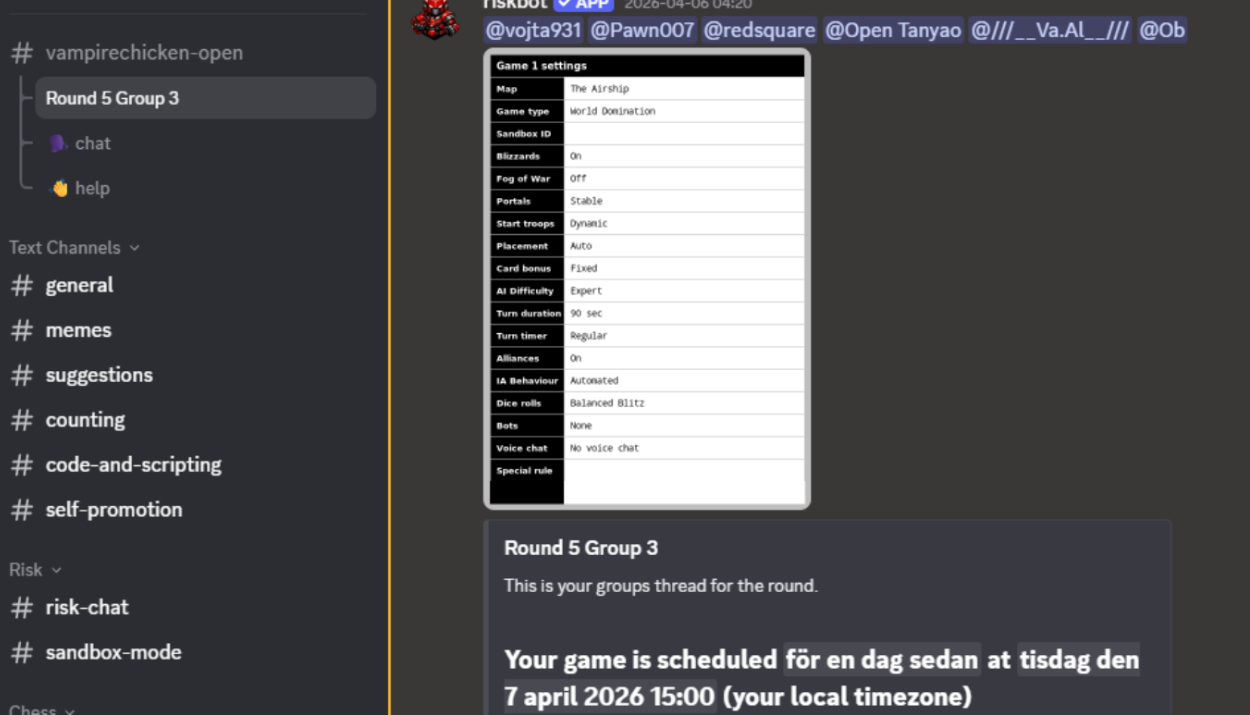
If your game time does not work, you can move to another group. All groups and their respective game times are viewable on the tournament website.
If the group you want to swap to has fewer than the intended amount of players, you can move there immediately.
If it is full, you need to find a player in that group willing to swap with you. Click the “copy ping” button on the group page and paste it to ping the players in that group. Then, send a message in the tournament’s help thread outlining your current game time and asking if they can swap with you.
Once you are able to switch, either by taking an open spot or swapping with another player, ping staff and they will move you.
45 minutes before your scheduled game time, you will be pinged in your group thread and asked to check in. It is as simple as clicking a button, and you have until game time to do so. If you fail to check in, you may lose your spot and be replaced.
Someone in your group must create the game in Casual → Private in Risk and share the lobby code in the group thread.
If you are unfamiliar with how to join friends' games using a lobby code, watch the video below
There are many different ways tournaments are structured. Below you will find an explanation of the two most common formats.
In most tournaments, you will usually play one game each week, but there are exceptions. Be sure to check out the rules document for the tournament you are participating in so you know what applies to you.
Over a set number of weeks, you accumulate points. During this period, people who do not gain enough points are gradually cut. In the end, there is usually a defined cutoff. For example, the top 96 advance to the next stage.
By placing higher and killing opponents, you earn more points. The exact scoring system can vary, so be sure to read the rules document for the tournament you are participating in.
The winner of each game advances to the next round. Bounties and placement do not matter, only the player who finishes first advances.
You will often compete in three-game sets during winner advance rounds. In these, you play a six player game, a five player game, and a four player game. The winner of each game advances to the next round.
Settings These show which options to select when creating the game, for example whether blizzards should be enabled.
Modifier Some settings include special rules that must be followed. For example, you may not be allowed to take a bonus. If a modifier is in play, it will be listed in the settings.
Stalemate If a game reaches a point where an ending does not seem near because kills are not worth it, it is considered a stalemate. How stalemates are handled is outlined in the tournaments rules document.
Group A group usually consists of you and five opponents. You are given a game time and pinged in a thread together.
Bounty Killing an opponent is called a bounty.
No-show If you miss your game, you are considered a no-show. To continue playing in the tournament you must fill in by responding to a ping in the tournaments help thread when a spot opens up.
Waitlist You are typically placed on the waitlist if you sign up after the soft close or narrowly miss advancing to the next round. If you are on the waitlist, you are eligible to fill in when spots open up. This is done the same way as for no-shows.
Check In 45 minutes before game time, you will be pinged by riskbot in your group thread and asked to check in. This is done by clicking the button labeled “Check in” in the message riskbot sends. If you fail to check in, you may lose your spot and be replaced.
Tournament Host or Tournament Director The person responsible for organizing the tournament. They write the rules, create new rounds, make the settings, and have the final say in disputes.
Tournament Staff or Event Helper They help the tournament director. Common tasks include swapping participants, answering questions, and ensuring everything runs smoothly. To contact staff, type “!staff” in any tournament-related thread.